


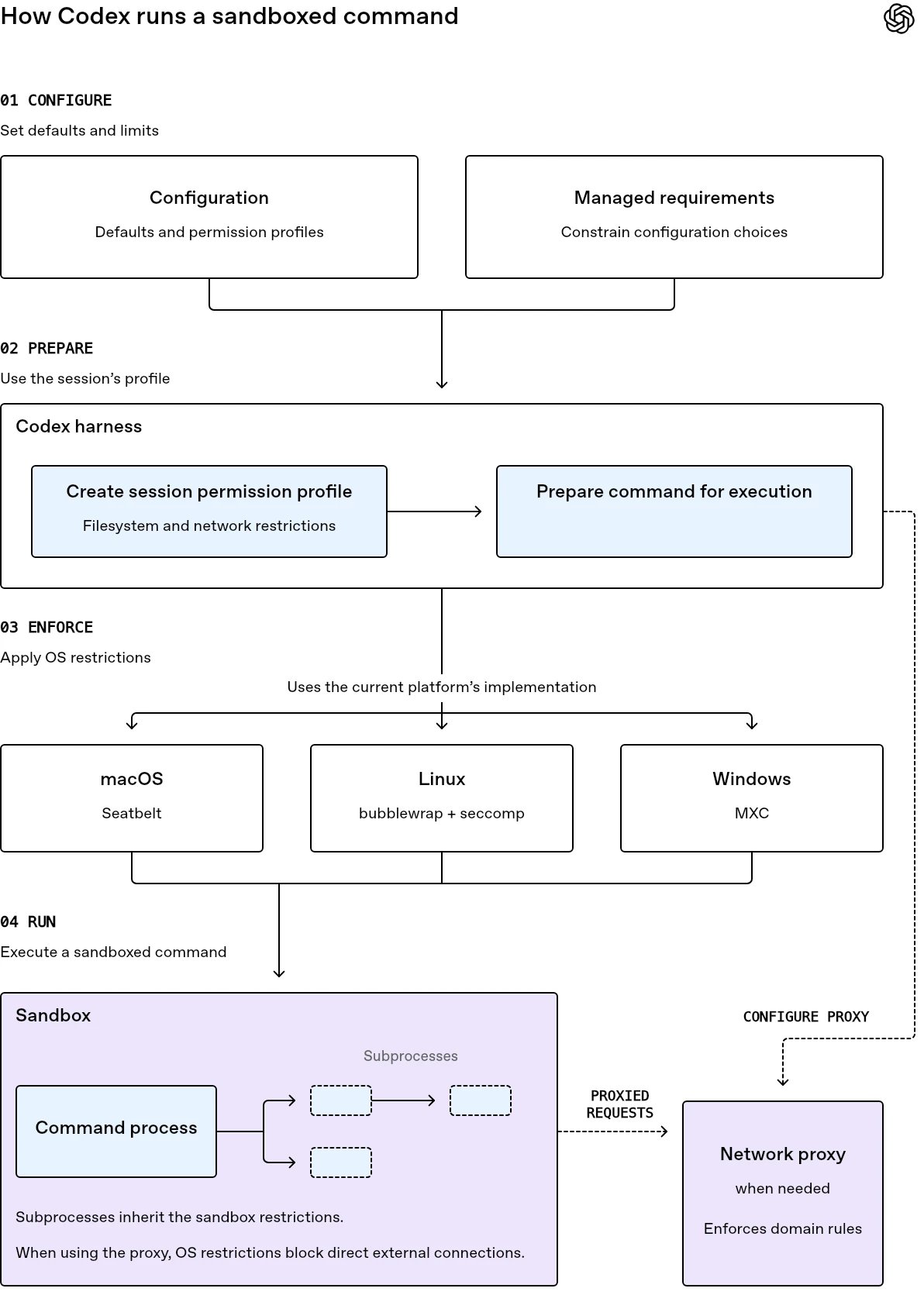
At OpenAI, we take a protection in depth(opens in a brand new window) strategy with regards to safeguarding brokers. While our investments in coaching and alignment are basic to this effort, we additionally implement options in our agentic harness, Codex(opens in a brand new window), to offer further protections. Because one among the commonest (and doubtlessly dangerous) issues Codex does is run instructions in your laptop, we constructed the Codex sandbox so Codex can work in your present surroundings inside filesystem and community limits you management.
In this text, we’ll begin with the tradeoffs behind Codex’s sandbox defaults, then clarify the sandbox’s design and the way the harness makes use of it to run instructions. We’ll present how finish customers and enterprises can tailor its permissions to their wants and the way builders can reuse the sandbox in their very own instruments. Finally, we’ll look at how these restrictions are enforced on macOS, Linux, and Windows.
In Codex, our philosophy is to specify conservative defaults for the sandbox that also allow significant work. For instance, with a Git repository as the workspace root, the built-in :workspace permission profile:
These restrictions forestall a big class of dangerous habits, however dangerous actions are nonetheless attainable. For instance, the agent may inject malicious code right into a regionally put in bundle equivalent to node_modules/prettier. Such a change won’t seem in git standing as a result of node_modules is usually ignored by Git. If the person’s editor runs that replicate of Prettier on save, merely saving a file may execute the malicious code exterior the Codex sandbox. This is why we take a protection in depth strategy: the sandbox limits what instructions can entry, whereas coaching and alignment assist the mannequin use that entry in accordance with the person’s intent.
For steerage on tailoring sandbox permissions and mixing them with different protections in an enterprise surroundings, see the Codex safety cookbook(opens in a brand new window).
Virtual machines and containers(opens in a brand new window) are two standard mechanisms used for sandboxing, however we take a unique strategy with the Codex sandbox. Instead of shifting computation to a separate surroundings to offer isolation, Codex makes use of every platform’s sandboxing services to constrain instructions working in the person’s present surroundings.
For many builders, their laptop computer serves as a bespoke dev surroundings that they’ll change on a whim. Reproducing that surroundings in a Docker container can take work, and a few workflows nonetheless depend upon instruments that run on the host.
For instance, think about using Codex to develop an iOS app on a Mac. If you determined to sandbox Codex by working it inside Docker, Codex wouldn’t be capable of run the iOS construct toolchain composed of native Mac executables, nor may it launch the iPhone simulator to run the code. A Docker-based workflow may delegate builds and simulator operations to the Mac host, however these operations would execute exterior the container’s sandbox and would wish their very own restrictions. For Codex, we favor to maintain issues easy by investing closely in OS-specific sandboxing so Codex can run in the surroundings that’s most applicable to the job at hand.
The harness exposes these OS-specific sandboxing mechanisms by way of a standard API throughout macOS, Windows, and Linux. This API takes a command and a permission profile. If the permission profile permits restricted community entry, the caller should provide a community proxy to implement these limits:
This operate begins the course of in a sandbox and returns a Child deal with the harness can use to attend for it to complete. Each little one course of inherits its mother or father’s sandbox constraints, so these restrictions apply all through the course of tree initiated by the command, even to descendants that outlive the authentic course of.
The following diagram reveals how these items match collectively, from configuration to working a sandboxed command. The sections that observe clarify every stage.
As defined in Unrolling the Codex Agent Loop, the Codex harness is chargeable for executing software calls generated by the mannequin. For coding duties, the mostly used software is a shell software, which runs instructions a lot as a person would in an interactive shell equivalent to Bash. Here we’ll look at the one-shot (opens in a brand new window)exec_command(opens in a brand new window) shell software(opens in a brand new window) for instance how the harness employs the sandbox to attain the desired protections.
This is a simplified model of how the exec_command software name can be honored by the Codex harness with out sandboxing:
To sandbox the command, the harness replaces the name to subprocess.Popen() with spawn_command_under_sandbox(). The harness provides the permission profile and, when wanted, the community proxy:
The exec_command software additionally lets the mannequin request completely different permissions for a person command, however the harness decides whether or not to grant the request:
When use_default is specified, the harness makes use of the default sandbox config for the flip. with_additional_permissions requests expanded entry inside the sandbox, whereas require_escalated requests execution exterior it. The harness evaluates the request primarily based on the person’s preferences earlier than executing the command. (For instance, Codex might immediate the person instantly, or it’d route the request to auto-review(opens in a brand new window).) If execution is permitted, Codex will go the applicable permission_profile and network_proxy to perform_exec_command_with_sandboxing() with the command arguments from the authentic ExecCommandToolCall.
A named permission profile helps you to reuse the similar filesystem and community restrictions throughout tasks. You can outline your individual profiles underneath [permissions] in config.toml. For instance, the following defines a profile named dev that extends(opens in a brand new window) the built-in :workspace profile:
In addition to its personal guidelines, dev inherits the following protections from :workspace:
When it involves configuring the community for the sandbox in Codex, there are roughly three choices:
-
Disable all community entry (default for the
:workspaceprofile) -
Enable full, direct community entry (default for the
:danger-full-accessprofile) -
Restrict community entry to a proxy, which decides what to let by way of primarily based on the permission profile
To give dev direct community entry, set permissions.dev.community.enabled = true at the high stage of config.toml. This grants full community entry when the community proxy is disabled.
To prohibit dev to a set of domains, allow the community proxy and configure its area guidelines:
Domain guidelines assist precise names and wildcard patterns, with specific deny guidelines taking priority over permit guidelines. Requests to different domains require approval or are blocked, as described in Network proxy under.
Individual customers can configure defaults that apply throughout tasks and override them for a selected trusted undertaking. Enterprise directors may need to configure defaults for his or her customers and constrain which settings these customers can change. Codex helps each by way of layered configuration and managed necessities.
As described in Configuration priority,(opens in a brand new window) Codex merges settings from a number of config.toml recordsdata. Tables are merged recursively, with the higher-precedence supply successful when values battle. Arrays are changed as a complete.
This is why permission profiles use tables for filesystem paths and community domains. A crew can add or override particular person entries in its personal configuration and robotically inherit adjustments to all different entries in the group’s base configuration:
Administrators also can provide managed necessities(opens in a brand new window) by way of necessities.toml to constrain customers’ configuration selections. These necessities can come from a number of sources, together with system recordsdata and cloud-provided coverage. A typical use case is to specify allowed_permission_profiles to constrain the set of permission profiles an enterprise person can choose. For instance, an administrator may specify these cloud necessities:
The cloud necessities would take priority over the system necessities file at /and many others/codex/necessities.toml, so an entry in that file can’t override the specific ":danger-full-access" = false above. Leaving :workspace unspecified permits one other necessities layer to provide that entry. Profiles whose entries are false or absent from the last merged desk are unavailable.
This separation lets organizations implement limits whereas customers tailor their configuration inside these limits. The ensuing permission profiles can be utilized by the harness or utilized on to a command, as we’ll see subsequent.
The Codex CLI offers a sandbox command to facilitate working an arbitrary command underneath a permission profile outlined in the Codex config. This is often used to check out the profile, guaranteeing that the sandbox prevents the habits it was designed to dam.
Indeed, on macOS this fails with:
The codex sandbox command makes Codex’s sandboxing mechanism accessible independently of an agent session. You can use the similar configuration language and platform-specific enforcement to constrain instructions launched by your individual instruments.
For a stdio MCP server configured in config.toml, the Codex harness doesn’t try and sandbox the command used to begin the server. Codex can’t reliably infer which recordsdata or community providers that server wants, so making use of a default sandbox profile may break an in any other case legitimate configuration.
For instance, the normal solution to configure the @modelcontextprotocol/server-memory(opens in a brand new window) MCP server to be used with Codex is as follows:
Because this npx command runs unsandboxed, it may well write recordsdata and make community requests with the similar permissions as the person working Codex, which is overly permissive. To lock it down, we are able to outline a permission profile named memory-mcp after which wrap the authentic npx command with codex sandbox --permission-profile memory-mcp to restrict the place the server can write and to stop it from accessing the community:
Before beginning the server, create its knowledge listing and populate the npm cache with the pinned bundle. That lets npx --offline launch the server underneath a profile that disables community entry:
Once the bundle is cached, Codex can begin the reminiscence server with out community entry, with writes restricted to the npm cache and the server’s knowledge listing.
The sandbox implementation turns a permission profile into restrictions enforced by the working system. The community proxy’s core request-handling and coverage logic is shared throughout all three main working programs, whereas proxy setup and integration with the sandbox are OS-specific. We’ll look at the shared proxy first, adopted by the implementations for macOS, Linux, and Windows.
To implement a permission profile’s community restrictions, the harness begins a community proxy and configures the sandbox to permit connections to it whereas blocking direct connections to exterior hosts. The proxy checks every request towards the profile’s area guidelines to find out whether or not to ahead it.
In the Codex repo, the community proxy is applied in the codex-network-proxy(opens in a brand new window) crate, which the harness makes use of as a library, although it will also be constructed as a standalone CLI(opens in a brand new window). When enabled, codex-network-proxy begins each an HTTP proxy and a SOCKS5 proxy by default. These proxy addresses are communicated to the course of spawned by the sandbox through surroundings variables. In addition to injecting normal surroundings variables equivalent to HTTP_PROXY, HTTPS_PROXY, and ALL_PROXY, a variety of well-known application-specific surroundings variables(opens in a brand new window) (equivalent to PIP_PROXY) are injected, as nicely. Admittedly, not all applications honor these surroundings variables. If a program makes an attempt a direct connection to an exterior host, the working system’s sandbox restrictions block it, as described in the platform-specific sections under.
The community proxy is chargeable for implementing the community restrictions outlined in a permission profile. For instance, the dev profile proven earlier permits requests to *.openai.com and explicitly denies requests to evil.instance. When a request targets a site that doesn’t match an permit or deny rule, the proxy can droop the request whereas it delegates to the harness for approval. Like the shell command instance, Codex might immediate the person instantly, or it’d route the request to auto-review(opens in a brand new window). Upon receiving a call, the proxy both permits the request to proceed or rejects it with an error response.
The order issues right here as a result of even a DNS lookup can leak info encoded in a hostname. The proxy subsequently resolves the requested hostname solely after figuring out that it’s allowed or permitted. Note that broad wildcard guidelines or entry to DNS providers can nonetheless allow DNS-based exfiltration.
On macOS, Codex makes use of Seatbelt(opens in a brand new window), Apple’s kernel-enforced sandboxing mechanism. Seatbelt insurance policies are written in Sandbox Profile Language (SBPL), a Scheme-based language for expressing sandbox restrictions. Codex invokes Seatbelt by way of macOS’s /usr/bin/sandbox-exec command. Like codex sandbox, it takes choices describing the sandbox adopted by the command to run:
When the community proxy is enabled as a part of a sandbox invocation, guidelines like the following are injected into the profile to restrict connections to the applicable native ports:
Codex’s base profile begins with (deny default), so outbound connections stay blocked until explicitly allowed.
Finally, the SBPL can include placeholders utilizing (param):
that are populated by the -Dkey=worth choices handed to sandbox-exec.
To implement its personal sandbox API, Codex builds up the record of arguments(opens in a brand new window) to sandbox-exec ranging from a base coverage(opens in a brand new window), after which makes use of permission_profile and different context to amend it to supply the full Seatbelt profile. The ensuing profile and accompanying -D arguments configure the restrictions enforced by Seatbelt, whereas the community proxy enforces further community guidelines. With the full arg record assembled, the invocation of sandbox-exec is easy.
Generating the appropriate SBPL is difficult as a result of Apple doesn’t doc the language for third-party use. Indeed, man sandbox-exec states The sandbox-exec command is DEPRECATED (as is the sandbox_init() library operate documented through man 3 sandbox_init). Despite the deprecation warning, macOS nonetheless ships Seatbelt profiles in /usr/share/sandbox, and third-party software program, together with Google Chrome and Chromium(opens in a brand new window), continues to depend on Seatbelt. As such, we plan to proceed to make use of Seatbelt for the foreseeable future.
To create the sandbox on Linux, Codex makes use of a mixture of bubblewrap(opens in a brand new window) (bwrap), a command-line software for establishing remoted environments, and seccomp-bpf(opens in a brand new window), a Linux kernel mechanism for filtering system calls. An inner helper named codex-linux-sandbox coordinates the setup. Like sandbox-exec on macOS, it takes a sandbox configuration adopted by a command to run:
When filesystem isolation or proxy routing is required, codex-linux-sandbox invokes bwrap to create the preliminary sandbox surroundings. bwrap then launches codex-linux-sandbox --apply-seccomp-then-exec inside it. This second invocation makes use of seccomp-bpf to use further restrictions earlier than working the person’s command.
To assemble that preliminary sandbox surroundings, Codex makes use of bubblewrap to create a filesystem view in a separate mount namespace that displays the permission profile’s filesystem guidelines. Because that is basic to the sandbox implementation, Codex distributors its personal copy of bwrap in case the person has not put in their very own, but it surely prefers a appropriate set up of (opens in a brand new window)bwrap(opens in a brand new window) discovered on PATH, when accessible. Empirically, some Linux distributions disable entry to person namespaces by default(opens in a brand new window), however grant an exception for the system bwrap.
Also like sandbox-exec, bwrap takes a sandbox configuration adopted by a command to run inside the sandbox. Instead of utilizing a customized config language like SBPL, bwrap makes use of particular person flags for configuration. Codex makes use of the following choices to create the filesystem view:
-
--bindto specify a writable file or listing -
--perms 000 --tmpfs DIR --remount-ro DIRto disclaim entry toDIR -
--perms 000 --ro-bind-data FD FILEto disclaim entry toFILE(the placeFDis an open file descriptor to/dev/null)
To apply deny globs utilizing these choices, Codex expands them to concrete paths earlier than launching every command. New matching paths aren’t robotically added to that command’s sandbox restrictions.
Codex additionally specifies choices equivalent to --unshare-ipc and --unshare-pid to stop the sandbox from accessing different forms of assets on the host, so bubblewrap impacts extra than simply file visibility.
When utilizing bubblewrap, Codex passes --unshare-net every time networking is disabled or connections should undergo the community proxy, which is able to create a brand new community namespace for the sandbox. We then use seccomp-bpf to use further restrictions on the networking system calls and socket households accessible to the command.
Specifically, we use the seccompiler crate(opens in a brand new window) to dynamically compile a BPF program primarily based on the desired filters(opens in a brand new window) and apply it to a launcher course of in the sandbox so the constraints are inherited by the complete course of tree. As such, bwrap doesn’t run the person’s command, however runs the codex-linux-sandbox launcher with its personal config args adopted by the person’s command:
To apply seccomp filters with out elevated privileges, the launcher units Linux’s no_new_privs flag(opens in a brand new window). This flag is inherited by little one processes and prevents them from gaining further privileges when executing one other program, equivalent to a setuid executable.
The seccomp filters depend upon the community configuration. When community entry is disabled, we block a variety of network-related syscalls, equivalent to join(2) and bind(2). Though when the community proxy is enabled in the sandbox, we permit IP sockets so the TCP listener created by codex-linux-sandbox will be reached, however block the creation of standalone Unix area sockets by default, as these may allow inadvertent entry to assets from the host.
The following diagrams illustrate this setup for one proxy endpoint, with one connection by way of it proven in the last diagram. Before launching bubblewrap, codex-linux-sandbox creates a Unix socket pair to function a management channel and forks itself. The little one runs run_host_bridge() and waits to obtain the listener’s file descriptor over that channel:

In this instance, the mother or father course of makes use of exec to interchange its program picture with bwrap. This units up the sandbox and launches codex-linux-sandbox --apply-seccomp-then-exec inside it, passing alongside the FD for the management channel:

Inside the sandbox’s community namespace, the second invocation of codex-linux-sandbox creates a loopback TCP listener and passes its file descriptor through the socket. The listener stays related to the sandbox’s community namespace, permitting the little one course of that remained exterior the sandbox to just accept connections from sandboxed applications whereas opening its upstream connections in the host’s community namespace. After the handoff, each processes shut their control-channel descriptors, and the course of inside the sandbox closes its copy of the listener.

The course of exterior the sandbox retains the listener open. For every accepted connection, it opens a connection to the configured proxy and relays knowledge in each instructions.
This further equipment provides the command its personal community namespace, together with a separate loopback interface. On macOS, Seatbelt permits the command to attach on to specified ports on the host’s loopback interface. On Linux, the command as a substitute connects to a listener inside its remoted namespace, and a course of exterior the sandbox relays these connections to the configured proxy. The descriptor handoff makes this connection attainable with out exposing the host’s community namespace to the command.
Earlier this yr, we applied and wrote about our sandboxing efforts on Windows. Since then, Microsoft has launched a library referred to as MXC alongside new options for course of isolation inside the Windows working system. We are at the moment changing our present sandbox with one which makes use of the MXC library.
MXC (Microsoft eXecution Container) is a sandboxed code execution system(opens in a brand new window) from Microsoft that helps a number of containment backends throughout Windows, Linux, and macOS. Codex helps an MXC-based sandbox on appropriate Windows units, utilizing native course of isolation to limit instructions inside the person’s present surroundings.
We are transitioning to MXC to enhance safety and usefulness whereas addressing a number of limitations of our present Windows sandbox:
-
Need for elevated/admin entry to arrange the sandbox
-
Expensive/gradual ACL checking and setting operations
-
Persistent sandbox setup state on the host machine, together with
-
ACLs
-
Firewall guidelines
-
Sandbox customers
-
Control aircraft recordsdata
-
MXC exposes a JSON configuration schema(opens in a brand new window). Codex makes use of the MXC SDK(opens in a brand new window) to assemble an execution request following that schema and containing the command, working listing, surroundings, and permissions. Those permissions cowl filesystem and community entry, together with Windows assets equivalent to the desktop and clipboard.
Codex interprets the permission profile’s filesystem and community guidelines into MXC’s configuration. Using the earlier dev profile, and assuming:
-
C:,D:andZ:are the machine’s solely native drives. -
The workspace root and dealing listing are
C:workdemo. -
The person’s residence listing is
D:Usersdev, so~/build-cacheresolves toD:Usersdevbuild-cache. -
The deny glob matches solely
C:workdemoconfigdev.envandC:workdemoconfigprod.env.
The corresponding MXC settings would come with:
One wrinkle: writable drive-root grants don’t apply recursively, so Codex expands them to incorporate the drive’s present quick youngsters.
MXC takes concrete deny paths solely, so Codex expands deny globs to matching recordsdata and directories earlier than launch. New paths that match the glob aren’t robotically added whereas the command is working.
Domain guidelines equivalent to *.openai.com are enforced by the shared Codex community proxy described earlier. Codex runs that proxy exterior the sandbox and passes its addresses to the command by way of the similar normal *_PROXY surroundings variables as talked about beforehand. MXC blocks direct exterior connections whereas permitting host-loopback connections, together with entry to the proxy. Other native providers stay reachable.
Across macOS, Linux, and Windows, the harness makes use of the similar sandbox API to launch instructions underneath a permission profile. The platform-specific implementations deal with the setup wanted to use these restrictions.
Writing and executing code provides brokers a versatile solution to resolve issues past software program growth. The Codex sandbox lets them use that functionality in the person’s present surroundings with specific limits on filesystem and community entry. It is a reusable primitive inside the harness, and the codex sandbox command makes it accessible to instruments you construct your self.
As brokers tackle extra duties, we need to make sandboxing sensible for extra instruments and environments. That means making permissions simpler to configure and benefiting from higher working system protections as they grow to be accessible. Our objective is to develop what brokers can do whereas maintaining folks answerable for what they’ll entry.
